F06 — A polygon stretched to its box
What you can do now
In the playground, a polygon has a new check box, Stretched to its box. Ticked, the polygon touches the four sides of its grey box instead of leaving room on one axis, and it stays a polygon: its number of corners, its rounded corners, its angle and its position work as before, and Convert to free shape does not move it.
The ideas behind it
The four sides touched. The regular polygon of F02 keeps its shape and fits its box on one axis only. Stretched, it fills the box: a hexagon in a square box touches the top and the bottom too.
Sides as even as possible (rule C, chosen by the Product Owner). Stretching makes some sides longer than others. The polygon keeps all its sides equal as long as every corner keeps at least half of its usual turn (30° for a hexagon, whose corners normally turn 60°). In a box too wide or too tall for that, the polygon stops equalizing at that limit and is simply stretched the rest of the way. The triangle stays isosceles and the square becomes the rectangle of its box: they have no freedom.
The anchor has no effect. A stretched polygon leaves no room in its box, so the anchor grid is greyed out. Unticking the box brings back the regular polygon, placed by its anchor.
Rounded corners. The corners of a stretched polygon no longer all have the same angle, so one radius may round them by different amounts: the page then says the effective radius is mixed, and Points mode shows it for each point.
| Term | In plain words |
|---|---|
| Stretched | the polygon touches the four sides of its box |
| Side | a straight edge of the polygon |
| Turn of a corner | the angle between the two sides meeting there; a regular hexagon turns 60° at each corner |
| Rule C | sides equal while every corner keeps half of its usual turn, then a plain stretch |
Rule C in five boxes
The same polygons (5 to 8 corners) in five boxes, drawn by rule C; under each one, its shortest and longest sides. In the square box the sides are equal; in the most elongated boxes the corners keep their limit and the sides become uneven.
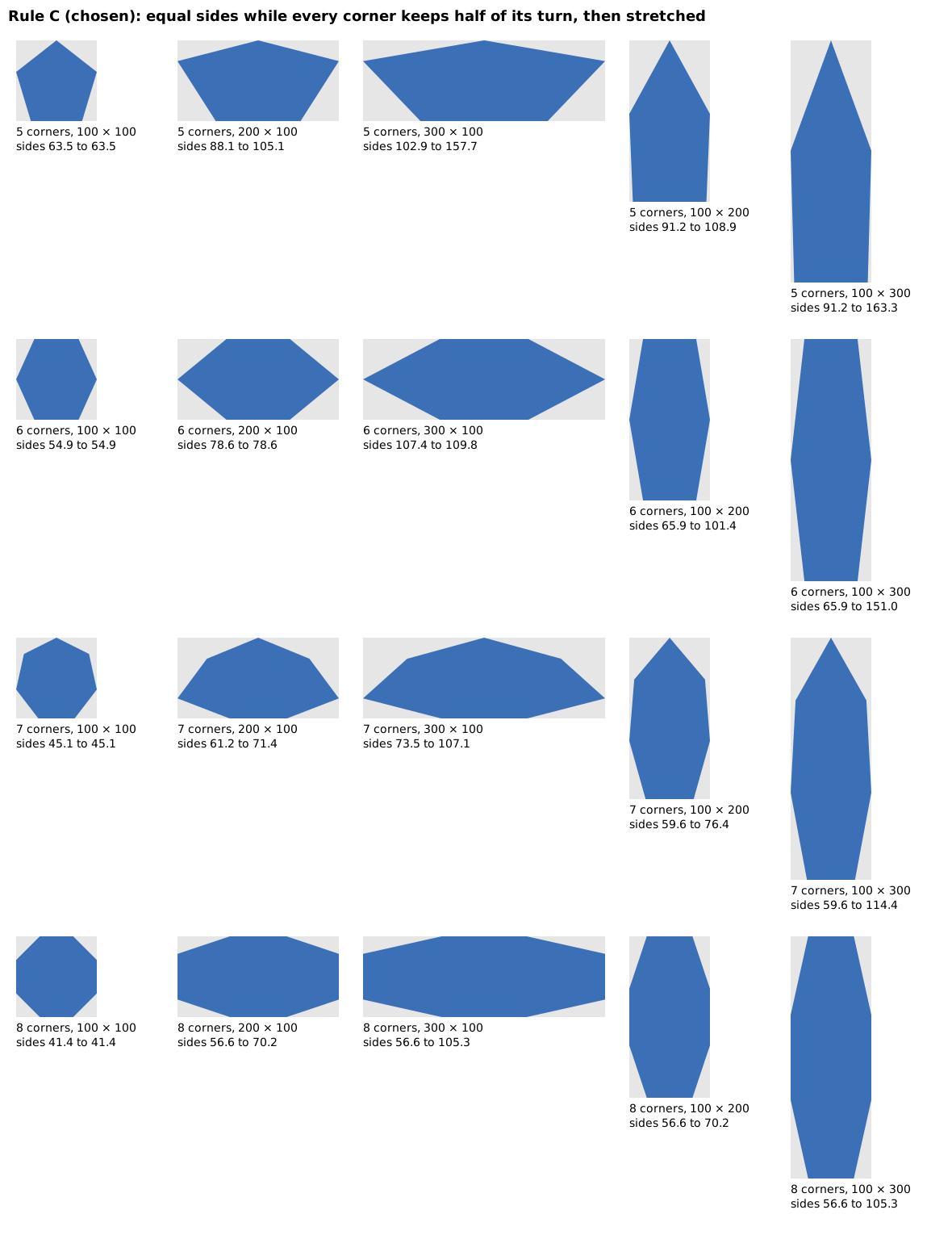
At the validation, rule C was compared with rule B, equal sides at any cost, drawn in the same boxes: its nearly flat corners ruled it out, and rule C, the one chosen at the start, stays. Rule B was only an image; it is gone.
Try it
Run npm run dev and open http://localhost:5173/?guide=epic&step=58: the Guided test opens on the first step of F06 (steps 58 to 66). Next types the polygon for you, ticked or not as the step says; the clicks are yours. The same steps are in the test card of US-021.
Limits
- Figma's polygon does not fill its box: there was no tool to copy, the rule comes from research note 0011.
- In very elongated boxes, every rule gives sharp or flat corners; rule C trades a little evenness of the sides for marked corners.
- Choosing the stretched polygon from the shape menu, rather than a check box, is for the editor applications.
Validation
Validated by the Product Owner on 2026-10-12 (VAL-009): after comparing the two galleries, they kept rule C, the rule planned from the start; rule B's shapes were not acceptable, and its material was removed before the feature pull request.